Sale by Discount Type
Report Parameters
|
Field |
Description |
|---|---|
|
Report Name |
The name of the report. |
|
Start Date |
The start date from when the data must be considered for generating the report. |
|
End Date |
The end date until when the data must be considered for generating the report. |
|
Report Category(s) |
Select the preferred report category from the drop-down list. |
|
Category(s) |
Select the preferred item category for generating the report. |
|
Discount(s) |
Select the preferred discount type(s) for generating the report. |
|
Summary View |
When enabled, summarized version of sale by discount type report is generated. |
|
Page Break |
When enabled, page breaks are added in the report. |
Sample Report
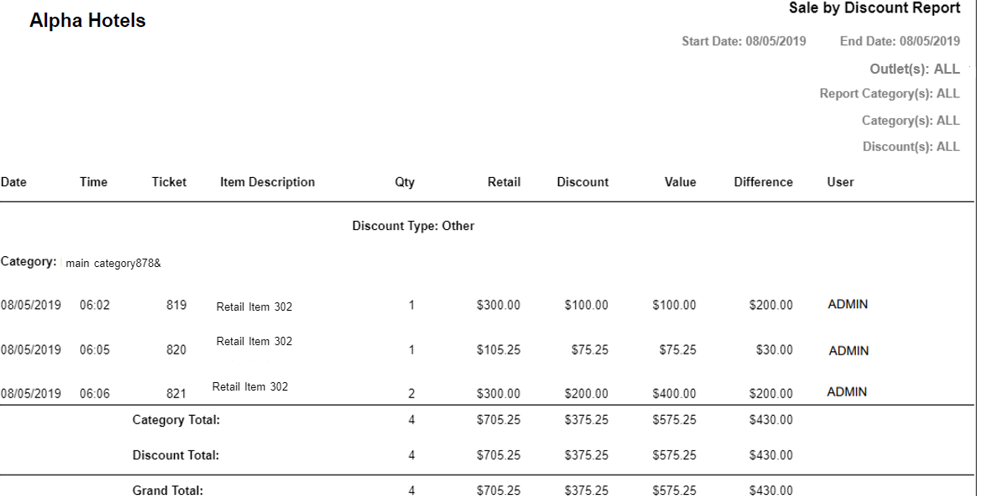
Report Fields
|
Field |
Description |
|---|---|
|
Date |
The date the ticket was generated. |
|
Time |
The time when the ticket was generated. |
|
Ticket |
The ticket number. |
|
Item Description |
The description of the item. |
|
Qty |
The number of items purchased by the client. |
|
Retail |
The sales price of the item. |
|
Discount |
The discount amount associated with the item(s). |
|
Value |
The price of the item sold after discount. |
|
Difference |
The price difference of the item between Sales Price and Discount Applied. |
|
Comment |
Comments entered by the user while adding discounts. |
|
User |
The username of the user who applied the discount to the ticket. |
|
Category |
The category associated with the ticket. |
|
Category Total |
The total quantity on hand, retail cost, discount, value, difference of the item(s) based on the category. |
|
Discount Total |
The total quantity on hand, retail cost, discount, value, difference of the item(s) based on the discount. |
|
Grand Total |
The total quantity on hand, retail cost, discount, value, difference of the item(s) for all the outlets. |